

Struggling to finish your project? I’ve found that a Pomodoro focus timer can be a simple but effective way to overcome procrastination, it’s ADHD-friendly and it helps starting even the most tedious tasks.
The way you use the pomodoro technique is that you basically break any type of work into short intervals, traditionally 25 minutes of focus followed by a 5 minute break. It remains one of the simplest, most proven time management methods for students, remote workers, writers, and developers. But which pomodoro app actually helps you build a daily focus habit?
In this post, I’ll compare in depth three popular Pomodoro apps: PomPom, Focus To-Do, and Forest, head to head. I’ll compare their features, usability, and pricing.
PomPom vs. Focus To-Do vs. Forest
| Feature | PomPom | Focus To-Do | Forest |
|---|---|---|---|
| Core focus timer | ✅ Fully functional and customizable | ⚠️ Customizable, not fully functional | ❌ Minimal control and function |
| Focus statistics & reports | ✅ Daily, weekly, monthly charts and trends | ✅ Daily, weekly, monthly, yearly reports | ✅ Daily, weekly stats and forest history |
| Gamification | ✅ Cute character with accesories | ❌ No gamification | ✅ Growing and buying trees |
| Distraction blocking | ✅ Keeps the screen on | ✅ Keeps the screen on | ⚠️ App allowlist blocker |
| White noise / focus sounds | ✅ Deep focus soundscapes | ✅ White noise & alarm sounds | ✅ Nature soundscapes |
| Cross-platform | ✅ iOS, Android | iOS, Android | ✅ iOS, Android |
| Pricing | 💲💲 | 💲💲💲 | 💲💲💲💲 |
| Best for | Balanced focus timer + stats | Task-heavy users who like lists | Users who love gamification |
What Is the Pomodoro Technique, and Why Does a Focus Timer App Help?
The Pomodoro Technique is a time management method that fights procrastination by lowering the barrier to starting. Instead of doing something half a day, you commit to one 25 minute focus session, just one pomodoro. A focus timer app automates the countdown, the breaks, and, crucially, the tracking.
Research on attention and habit formation consistently shows that short focus intervals help maintain concentration and reduce mental fatigue. A good pomodoro timer app turns that method into a daily focus habit by adding:
- Custom intervals: not everyone works best in 25-minute blocks; deep work fans often prefer 50/10 sessions.
- Focus statistics: visual reports of how much you focused each day, week, and month make time visible.
- Task integration: attaching each pomodoro to a task answers the question “what am I actually working on?”
That’s exactly where the three apps in this comparison differ the most.
PomPom: A Minimalist Pomodoro
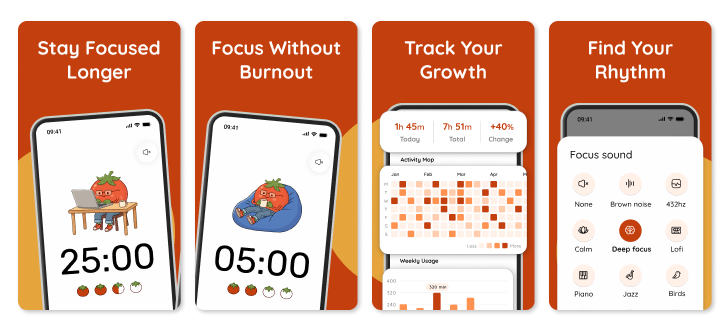
PomPom is a modern pomodoro focus timer designed around one idea: a focus app should make you want to start the next pomodoro and show you in charts, what that focus added up to.
Key features
- Classic pomodoro sessions by default (25/5), fully customizable: adjust focus intervals, short breaks, and long breaks for study sprints, deep work blocks, or ADHD-friendly shorter sessions.
- Advanced statistics with charts: daily, weekly, and monthly reports show your focused hours, productivity trends, and balance between focus and breaks.
- Focus soundscapes: white noise, nature sounds and music to settle into distraction free work.
- Gesture based controller: control the timer using intuitive gestures with the device, perfect for situations where you don’t want to touch the screen.
- Personalization: Upgrade your character with new looks and change the colors of focus and break to make it more understandable for you personally.
Who it’s best for
PomPom is the best pick if you want a clean focus timer that still gives you the productivity statistics to prove your progress, ideal for students tracking study hours, professionals doing deep work, and anyone who found other pomodoro apps too complicated.
Where it falls short
PomPom is a simple app designed to do exactly what it promises: help you stay focused and avoid procrastination. It doesn’t have much gamification around progress, nor does it offer a full GTD-style task manager for projects. Instead, it gives you charts, and provides a functioning timer that counts every second.
Focus To-Do: Pomodoro Timer & Task Manager
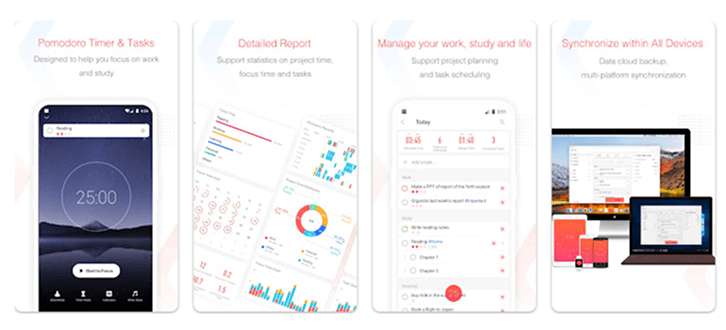
Focus To-Do is a pomodoro timer paired with a basic to-do list. It has been available for a while now. The core functionality involves selecting a task, running a 25 minute timer, and taking a 5 minute break afterward.
Key features
- Task management with subtasks and to-do lists: more than most focus timers, though lighter than dedicated tools like Planndu.
- Per-task pomodoro logging: the app records how many sessions each task consumed, with daily/weekly/monthly reports in a calendar view.
- Reminders: with the option to repeat and receive notifications when a task is due.
- Sounds: white noise, alarms, and vibration reminders to support work and study focus.
Who it’s best for
Students and solo workers who want their pomodoro timer and to-do list in a single app for both errands and work. It has great value, but not a replacement for a full-featured task manager.
Where it falls short
The task features are solid, but it feels too bloated yet insufficient for full task management. If you live in Planndu or need Kanban boards and calendar integration, Focus To-Do remains limited within the task sphere.
Forest: The App That Grows Virutal Trees
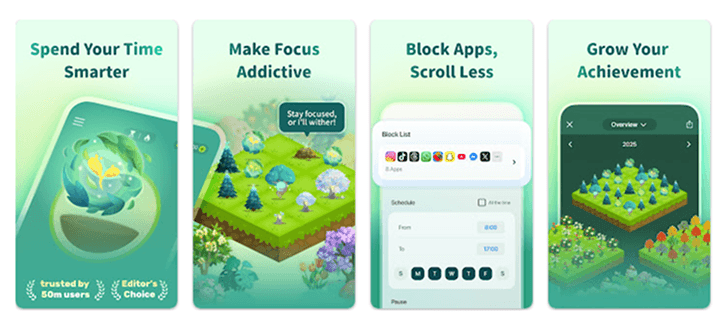
Forest, a Duolingo-like gamified app, reframes the Pomodoro technique as a game: start a focus session, and a tree grows on your screen. Leave the app to check Instagram, and the tree dies. Stay focused, and the tree joins your forest, a visible record of every minute you chose distraction.
Key features
- Gamified pomodoro timer: every minute of focus grows a tree, distraction kills it.
- App allowlist blocker: lock other apps during focus sessions.
- Time Guard scheduled: plan daily digital-detox blocks in advance.
- Tree shop: spend in-app coins and partner organizations to buy virutal trees.
- Friends and leaderboards: plant trees together with friends for social accountability.
Who it’s best for
People whose main enemy is the phone itself. If procrastination looks like doom-scrolling, the “don’t kill the tree” manipulation is remarkably effective and it’s a nice pick for students fighting phone addiction.
Where it falls short
Forest does nothing beyond the trees game, no advaned charts and no configurable timer. You’re unable to pause, stop or reset the timer. Some users also find the gamification childish or distracting by itself.
Feature by Feature Breakdown
The Core Focus Timer
The timer is the heart of any Pomodoro app, and it’s where the three differ most.
PomPom has the strongest timer. It’s fully functional and customizable, so you can set session lengths to your own rhythm instead of being locked into a rigid 25/5 loop. If 50 minute deep work blocks suit you, or 15 minutes is all you can manage on a bad day, PomPom adapts.
Focus To-Do offers customization too, but the timer isn’t fully functional. It’s flexible enough to set up, yet it doesn’t cover everything a dedicated timer should, because the app is built around task management first.
Forest has the most minimal timer: plant a tree, the timer runs, the tree grows. That simplicity is part of its charm, but you get limited control. The timer is a mechanism for the game, not a productivity tool in its own right.
Conclusion: PomPom wins clearly. Focus To-Do is usable but limited, and Forest trades timer power for simplicity.
Focus Statistics and Reports
PomPom gives you daily, weekly, and monthly charts and trends, enough to see your habits evolve without drowning in data.
Focus To-Do does more or less the same with daily, weekly, monthly, and yearly reports.
Forest offers daily and weekly stats plus its forest history, which is less analytical but more emotionally satisfying.
Conclusion: Focus To Do & PomPom both win for the deepest reporting, and clean charts.
Gamification
PomPom gives you a cute character you can dress up with accessories. It’s progress and personality without much gamification around it.
Focus To-Do has none. A relief for some, a missing spark for others.
Forest is the champion: grow trees, earn coins, buy new species, and build a forest over time. The threat of a dying tree adds a guilt-driven incentive.
Conclusion: Forest for the full game, PomPom for a lighter, charming version, Focus To-Do if you want none of it.
Distraction Blocking
PomPom and Focus To-Do both keep the screen on during sessions. It’s a visible nudge, not a lock.
Forest goes further with an app allowlist blocker that puts real blocker between you and social media.
Its ⚠️ rating reflects that it may heat the device and not a good practice in terms of privacy.
Conclusion: If willpower is your weakness, Forest’s blocker is the strongest of the three. If you just want a visible timer, screen-on is enough.
White Noise and Focus Sounds
All three include background audio: PomPom with deep focus soundscapes, Focus To-Do with white noise and alarm sounds, and Forest with nature soundscapes that match its theme.
Conclusion: A tie on availability. Choose by taste.
Platform Support
All three run on iOS and Android, so none of them locks you into one ecosystem.
Pricing
PomPom is the most affordable with $2.99 plan monthly and $19.99 yearly (💲💲).
Focus To-Do sits in the middle (💲💲💲), with a lifetime premium of around $11.99.
Forest is the most expensive overall (💲💲💲💲), with a $59.99 yearly subscription.
Which Pomodoro App Should You Choose in 2027?
Choose PomPom if you want a balanced, minimalist pomodoro focus timer, clear focus statistics charts, and custom intervals, best for students, deep work, and ADHD-friendly focus routines.
Choose Focus To-Do if tasks come first, it’s a good pomodoro + to-do list combo, with average pricing and decent user experience.
Choose Forest if phone addiction is your productivity killer and gamification genuinely motivates you.
FAQ: Pomodoro Apps, Focus Timers, and the Pomodoro Technique
What is the best pomodoro app in 2027? PomPom if you’re looking for a clean focus timer with statistics, Focus To-Do for pomodoro + task management, and Forest for gamified digital detox.
Is the pomodoro technique good for studying? Yes. Short 25-minute focus sessions with breaks are proven to help students maintain concentration, fight procrastination, and track study hours, most study timer apps, including all three compared here, are built around it.
Do focus timer apps help with ADHD? Many users with ADHD report that time-boxed sessions and visual progress make starting tasks easier. Forest even markets itself explicitly for managing ADHD and staying focused. Structured timers help, though they’re tools, not treatment.
What’s the ideal pomodoro interval length? The classic is 25/5 with a longer break after four rounds, but the best apps let you customize intervals: 50/10 for deep work, shorter blocks for ADHD-friendly sessions.
Are pomodoro apps free? All three have free versions. Most apps Pomodoro apps provide free basic version and more advanced one for purchase.